


Frontline mobile-device planning for Hong Kong retail teams
Retail Communication Hardware for Frontline Teams
Give store teams suitable mobile work points for approved messages, calls, task updates and exception escalation. Easy Scan helps retailers assess mobile computers, rugged tablets, accessories, charging and deployment support, while collaboration software, user identity, permissions and communication records stay with the selected platforms.
Overview
Support frontline communication with the right device plan
Plan mobile work points for approved messages, calls, task updates and exception escalation across frontline teams. This page follows the physical checkpoints, records and hand-offs that should be understood before product categories are narrowed or a deployment is planned.
The primary equipment review covers Mobile computers, Rugged tablets. Easy Scan can help match these categories to the site, workload, identification samples, connectivity, power and support route; exact configuration remains subject to application and compatibility checks.
- Operating scope:Separate the mobile work point from the communication platform
- Critical hand-off:Define each communication by purpose and required response
- Equipment bundle:Review Mobile computers, Rugged tablets by work point instead of beginning with individual models.
- Deployment evidence:Use representative users, items, locations and exceptions during the site walkthrough.
Collaboration scope and platform boundary
Separate the mobile work point from the communication platform
Device
Provides the screen, input, audio and connectivity supported by the chosen configuration. Check this requirement at the required work point with its actual power, connectivity, space and operator movement. Include the intended mount, cradle, charger or other required accessory so the review covers the complete setup.
Application
Controls approved messages, calls, tasks, presence and records. The completed record should show the next user what was checked, what changed and what still requires attention, so the expected hand-off is clear at the real work point.
Identity
Defines who may sign in, see a team or take an action. Review this step with the employees who perform and supervise it. Confirm that the instruction, status choices and escalation wording are understood consistently across the intended shift or work area.
Operational owner
Sets channel rules, escalation, retention and review responsibility. Review this step with the employees who perform and supervise it. Confirm that the instruction, status choices and escalation wording are understood consistently across the intended shift or work area.
Message, task, alert and update types
Define each communication by purpose and required response
- Information update:Share an approved operational notice that does not require ownership transfer.
- Task hand-off:Assign work with a clear owner, due state and completion route.
- Exception alert:Notify the responsible role with the minimum required context.
- Live coordination:Use supported voice or messaging only where the selected platform permits it.
Worker, role, zone and device identity
Know who is communicating, where they work and which device is assigned
Worker or shared role
Choose named-user or shared-role access according to the approved identity design. Turn the responsibility required at this checkpoint into a clear instruction for the relevant role. The user should know the required input, permitted decision and named escalation route before this task is added to daily work.
Store and zone
Map messages and tasks to the correct site, department or service area. Check this requirement at the required work point with its actual power, connectivity, space and operator movement. Include the intended mount, cradle, charger or other required accessory so the review covers the complete setup.
Device identity
Track assignment, configuration, return and issue ownership. Keep the physical item, its identification and the resulting status connected throughout the process. If one element is missing, follow the page's exception route before the workflow continues.
Shift start, login and availability
Prepare the worker, device and channels before frontline work starts
- Collect device:Confirm assigned unit, charge, condition and required accessories.
- Sign in:Use the selected identity and permitted authentication method.
- Join the right team:Show only approved store, zone, role and shift channels.
- Availability state:Let the selected application define presence, breaks and unavailable status.
Voice, text, push and call boundary
Test the selected communication modes in the real store environment
Hardware capability alone does not establish calling, push-to-talk, messaging, recording, emergency or conferencing functions. Confirm the selected application, licences, network, audio accessories, user permissions, privacy rules and retention requirements.
Voice and audio
Test ambient noise, speaker, microphone, privacy and accessory use. Test this hands-busy task with the intended glove, trigger and host-device arrangement. The trial should cover repeated scans, movement between locations and how the equipment is returned for charging.
Text and forms
Test screen size, input effort, language and required attachments. Test this step with representative items and records from the required workflow. Confirm what the operator can decide here and which condition must be handed to an authorised reviewer.
Notifications
Define priority, sound, vibration, display and acknowledgement. Keep the physical item, its identification and the resulting status connected throughout the process. If one element is missing, follow the page's exception route before the workflow continues.
Call or group session
Verify participants, controls, network behaviour and record ownership. Test this step with representative items and records from the required workflow. Confirm what the operator can decide here and which condition must be handed to an authorised reviewer.
Task hand-off and acknowledgement
Give the next person enough context to act without exposing extra data
An approved hand-off should identify the store or zone, work type, subject, priority, owner, required response and exception route. Where the selected application supports scans, notes or images, collect only what the task requires.
Hardware supplies the mobile interface. It does not verify that work is complete or decide whether an exception is resolved.

Priority and escalation boundary
Keep urgent and safety-critical communication inside approved procedures
- Normal update:Route routine information without interrupting unrelated teams.
- Operational exception:Notify the responsible supervisor or support role with clear context.
- Safety or emergency event:Follow the retailer’s approved emergency channels and procedures.
- No response:Define timeout, escalation and alternate contact within the selected platform.
Frontline communication product categories
Choose the mobile screen and carrying format around the work
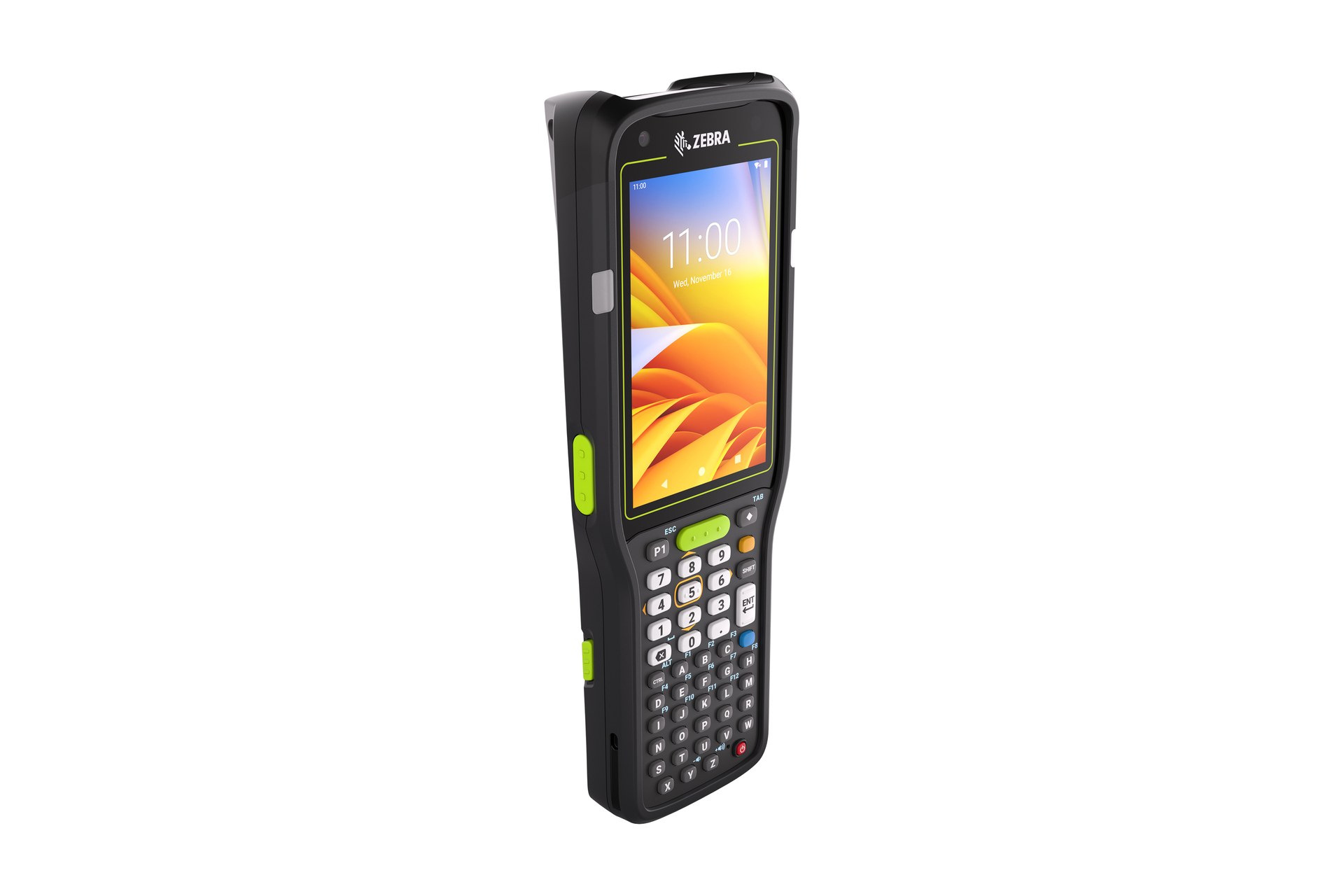
Mobile Computers
For supported mobile messaging, task review, scanning and input during frontline work. Build the trial around the on-screen task and data entry required at this checkpoint. Check scanning, keypad or touch input, carrying method, charging and required connectivity as one mobile workflow.

Rugged Tablets
For supported work that benefits from a larger display, forms or shared review. Test the larger-screen work at its intended location and while moving if required. Check how the user holds or mounts the tablet, enters information and returns it for charging or hand-off.
Device profile, accessories and charging
Build a complete frontline kit for each role and shift
- Role profile:Match screen, input, audio and scan needs to the actual work.
- Carry and protection:Review cases, straps, holsters, stands and shared-device return points.
- Audio accessories:Verify connector, fit, hygiene, ambient noise and application support.
- Charging plan:Define shift duration, charging positions, spare ownership and hand-over.
Wi-Fi, cellular and dead-zone validation
Test communication where staff actually walk and work
Survey back rooms, sales floors, lifts, loading areas, entrances, car parks and other relevant zones. Confirm the selected device, network and application behaviour during weak signal, roaming, reconnection and concurrent use.
Coverage map
Record expected network by store and work zone. The hand-off should provide a status that the next work area can act on. If the record and physical condition do not agree, preserve the difference for review rather than replacing the earlier status.
Roaming and reconnect
Test calls, messages and task states across access points or networks. Test this step with representative items and records from the required workflow. Confirm what the operator can decide here and which condition must be handed to an authorised reviewer.
Delayed update
Keep incomplete or queued actions visible where the application supports them. Build the trial around the on-screen task and data entry required at this checkpoint. Check scanning, keypad or touch input, carrying method, charging and required connectivity as one mobile workflow.
Fallback route
Define the approved alternate contact when the platform is unavailable. The completed record should show the next user what was checked, what changed and what still requires attention, so the expected hand-off is clear at the real work point.
Shared-device privacy and record ownership
End each shift without carrying one worker’s access into the next
- Sign out:Close the selected application and identity session according to policy.
- Local data:Define what may remain on the device and how it is protected.
- Communication record:Assign storage, retention, access and review to the selected platform owner.
- Lost or misplaced device:Use the approved reporting and device-management process.
Cleaning, repair, spares and return
Keep shared mobile equipment ready for the next team
Clean and inspect
Use approved methods and check device, screen, audio and accessories. Use the site conditions required at this checkpoint to confirm placement, cable or wireless reach, charging and safe access for support. Record constraints before selecting a product configuration or planning installation.
Report issue
Record the device identity, symptom, work impact and responsible owner. Test this step with representative items and records from the required workflow. Confirm what the operator can decide here and which condition must be handed to an authorised reviewer.
Return and replace
Use assigned charging, spare and repair routes without losing open work context. Use representative returned goods to check how this status is recorded and handed to the next responsible area. Commercial disposition remains with the authorised business role, while hardware supports identification and evidence capture.
Application, identity and device-management boundary
Verify the complete platform before deployment
Confirm the selected communication or task application, identity provider, device-management method, network, permissions, update process, security controls, support ownership and record handling. Easy Scan can help assess the hardware work point and deployment inputs; software capability must be verified separately.
- Application owner:Defines functions, channels, licences and operational support.
- Identity owner:Defines accounts, roles, authentication and access removal.
- Device owner:Defines enrolment, configuration, updates, inventory and retirement.
- Network owner:Defines connectivity, segmentation, certificates and incident route.
Connected frontline workflows
Link communication to the work that store teams perform

Retail Technology Solutions
Place team communication inside the wider retail hardware plan. The completed record should show the next user what was checked, what changed and what still requires attention, so the expected hand-off is clear at the real work point.

Task Management
Define assignment, acknowledgement, completion and exception states. The hand-off should provide a status that the next work area can act on. If the record and physical condition do not agree, preserve the difference for review rather than replacing the earlier status.

Workforce Management
Keep device access aligned with authorised roles, shifts and teams. The hand-off should provide a status that the next work area can act on. If the record and physical condition do not agree, preserve the difference for review rather than replacing the earlier status.

Merchandising
Give shelf and display exceptions a clear communication route. The hand-off should provide a status that the next work area can act on. If the record and physical condition do not agree, preserve the difference for review rather than replacing the earlier status.
Communication review inputs
Walk one shift from device collection to return
- People and roles:Stores, zones, shifts, named or shared users, supervisors and support owners.
- Communication types:Updates, calls, tasks, exceptions, priorities and approved fallback routes.
- Environment and network:Noise, privacy, coverage, roaming, dead zones and customer-facing areas.
- Devices and platforms:Current hardware, applications, identity, management, accessories and charging.
Frequently asked questions
Retail communication hardware planning questions
What should be defined before selecting frontline communication hardware?
Define users, roles, stores, zones, communication types, applications, identity, permissions, network coverage, privacy, charging, accessories, hand-over and support ownership.
Which product categories may support frontline collaboration?
The review may include mobile computers and rugged tablets. Suitability must be verified against the selected communication or task application, network and actual work points.
Does a mobile device include team communication software?
Not by itself. Voice, messaging, push-to-talk, tasks, presence, recording and group functions depend on the selected application, licences, network and permissions.
How should shared devices be managed between shifts?
Define collection, sign-in, role access, sign-out, local-data handling, cleaning, charging, issue reporting, return and spare-device routes.
Does frontline communication hardware need an ERP connection?
No. Mobile communication hardware can support the selected collaboration, identity, network and device-management platforms without an ERP connection. Confirm any separate system integration only when the workflow requires it.
What should we prepare for an Easy Scan review?
Prepare one shift, key roles and zones, required communication types, current devices and applications, identity owner, network map, accessories, charging plan and common exceptions.
Review your frontline communication work points with Easy Scan
Share one shift, user roles, stores and zones, required communication modes, current applications, network conditions, devices, accessories, charging and exception routes. We can then discuss suitable hardware categories and verification steps.
