


Store hardware and workflow planning for Hong Kong retailers
Retail Technology Hardware for Hong Kong Stores
Connect checkout, inventory, fulfilment, returns and frontline work with practical scanning, mobile computing, printing, RFID, labels and local deployment support. Easy Scan helps retailers start with the real work point, then match suitable product categories and integration boundaries.
Overview
Map retail hardware to each customer and stock workflow
Map customer, sales-floor, back-of-house, fulfilment, returns and staff work points before selecting retail hardware. This page follows the physical checkpoints, records and hand-offs that should be understood before product categories are narrowed or a deployment is planned.
The primary equipment review covers Barcode scanners, Mobile computers, Barcode printers, Receipt printers, RFID equipment, Labels and ribbons. Easy Scan can help match these categories to the site, workload, identification samples, connectivity, power and support route; exact configuration remains subject to application and compatibility checks.
- Operating scope:Plan retail technology around four connected store zones
- Critical hand-off:Match checkout hardware to the transaction and counter layout
- Equipment bundle:Review Barcode scanners, Mobile computers, Barcode printers, Receipt printers, RFID equipment, Labels and ribbons by work point instead of beginning with individual models.
- Deployment evidence:Use representative users, items, locations and exceptions during the site walkthrough.
Store operating map
Plan retail technology around four connected store zones
A useful store plan follows the item, customer request and staff task across the shop. Define the record owner and exception path at each zone before comparing hardware.
Customer and transaction
Product identification, checkout input, receipt output and assisted service. The completed record should show the next user what was checked, what changed and what still requires attention, so the expected hand-off is clear at the real work point.
Sales floor and inventory
Price, shelf, stock, replenishment and merchandising work. Use the item, location, unit and quantity rules required at this checkpoint to prepare the scan or entry screen. When the physical result differs from the expected record, preserve the discrepancy for review instead of forcing a match.
Back of house and fulfilment
Receiving, storage, order preparation, packing and hand-off. Test this step with representative items and records from the required workflow. Confirm what the operator can decide here and which condition must be handed to an authorised reviewer.
Returns and store tasks
Returned goods, exceptions, team communication and work completion. Keep the returned item, its recorded identity and its current physical status together at this step. If they do not agree, route the item to the required exception review instead of overwriting the original record.
Customer and transaction zone
Match checkout hardware to the transaction and counter layout
- Product and customer input:Define which product codes, digital codes, membership references or authorised inputs must be read.
- Counter position:Review presentation scanning, handheld scanning, cable routing, available space and staff movement.
- Receipt and document output:Confirm the required paper, content, interface, counter position and replacement route.
- Transaction exception:Keep unreadable codes, mismatched items and restricted actions inside the approved store process.
Sales floor and inventory zone
Give store teams a reliable point for item and location work
Item enquiry
Identify the physical item before displaying approved product or stock information. Test this checkpoint with representative items and locations, including duplicate, missing or unreadable identification where relevant. The next action should follow the required exception path and keep the original count visible.
Inventory count
Capture the item, location and quantity through a defined counting and review process. Test this checkpoint with representative items and locations, including duplicate, missing or unreadable identification where relevant. The next action should follow the required exception path and keep the original count visible.
Shelf replenishment
Connect the replenishment request, source location, movement and shelf confirmation. Use the item, location, unit and quantity rules required at this checkpoint to prepare the scan or entry screen. When the physical result differs from the expected record, preserve the discrepancy for review instead of forcing a match.
Merchandising task
Present the approved shelf, display, label or promotional work to the responsible team. Use the label purpose required at this checkpoint to confirm size, material, adhesive and expected life against representative surfaces. If thermal-transfer printing is involved, check the ribbon together with the printer and label rather than as a separate purchase.
Back of house and fulfilment
Keep store stock movement visible from receipt to customer hand-off
- Receive and identify:Match the physical delivery, expected record, item identity and store location.
- Store and replenish:Separate back-room storage from stock released to the selling floor.
- Pick and prepare:Confirm the order, item, quantity, status and permitted substitution path.
- Pack and hand off:Keep the prepared order tied to the correct customer, carrier or collection point.
Returns, exceptions and team work
Separate operational evidence from business decisions
Mobile hardware can identify items, present approved tasks and capture permitted status updates. It does not decide refunds, fraud, security actions, staff performance or loss outcomes. Those decisions remain with the retailer’s authorised policies and systems.
Returns intake
Identify the item and transaction reference before the authorised condition and disposition review. Use representative returned goods to check how this status is recorded and handed to the next responsible area. Commercial disposition remains with the authorised business role, while hardware supports identification and evidence capture.
Loss and asset events
Record only permitted operational observations and route them to the responsible role. Turn the responsibility required at this checkpoint into a clear instruction for the relevant role. The user should know the required input, permitted decision and named escalation route before this task is added to daily work.
Tasks and communication
Show the assigned work, location, priority, completion state and exception owner. Review this step with the employees who perform and supervise it. Confirm that the instruction, status choices and escalation wording are understood consistently across the intended shift or work area.
Retail solution routes
Open the workflow that matches the current store priority

Inventory Counting
Plan item, location, quantity and count-review checkpoints. Use the item, location, unit and quantity rules required at this checkpoint to prepare the scan or entry screen. When the physical result differs from the expected record, preserve the discrepancy for review instead of forcing a match.

Loss Prevention
Define identification, observation and escalation boundaries. Review this step with the employees who perform and supervise it. Confirm that the instruction, status choices and escalation wording are understood consistently across the intended shift or work area.

Point of Sale
Match scanning, transaction input and receipt output to the counter. Use the item, location, unit and quantity rules required at this checkpoint to prepare the scan or entry screen. When the physical result differs from the expected record, preserve the discrepancy for review instead of forcing a match.

Merchandising
Support approved product, display, shelf and label tasks. Test the intended surface and environment with the actual barcode layout. Confirm whether direct thermal or thermal transfer is required, then review the consumable as part of the complete print workflow.

Retail Replenishment
Connect stock demand, source, movement and shelf confirmation. Use the item, location, unit and quantity rules required at this checkpoint to prepare the scan or entry screen. When the physical result differs from the expected record, preserve the discrepancy for review instead of forcing a match.

Omnichannel Order and Fulfilment
Plan store picking, packing, collection and delivery hand-offs. Keep the physical item, its identification and the resulting status connected throughout the process. If one element is missing, follow the page's exception route before the workflow continues.

Communication and Collaboration
Route store updates and operational exceptions to the right team. Build the trial around the on-screen task and data entry required at this checkpoint. Check scanning, keypad or touch input, carrying method, charging and required connectivity as one mobile workflow.

Retail Returns
Identify returned goods and keep the disposition route controlled. Keep the returned item, its recorded identity and its current physical status together at this step. If they do not agree, route the item to the required exception review instead of overwriting the original record.

Task Management
Present assigned store work, status and exception ownership. Keep the physical item, its identification and the resulting status connected throughout the process. If one element is missing, follow the page's exception route before the workflow continues.

Workforce Management
Equip frontline roles for consistent operational work points. Review this step with the employees who perform and supervise it. Confirm that the instruction, status choices and escalation wording are understood consistently across the intended shift or work area.
Retail product categories
Choose product types by work point, not by a generic store list
Start from the counter, aisle, stockroom, dispatch point or mobile task. Review the application, scanning distance, screen input, printing, connectivity, power, accessories, media and physical environment together.

Barcode Scanners
For fixed and mobile barcode capture at counters, aisles and stockrooms. Test representative barcodes in the work position required at this checkpoint, including the normal scan distance, label presentation and host connection. This confirms whether the scanner category fits the actual item flow before individual products are compared.

Mobile Computers
For work combining scanning, instructions, input and mobile hand-offs. Use a representative shift to confirm that instructions, scanning and status entry remain practical while the employee moves between the required work points. Include the intended case, cradle or other required accessory in the review.
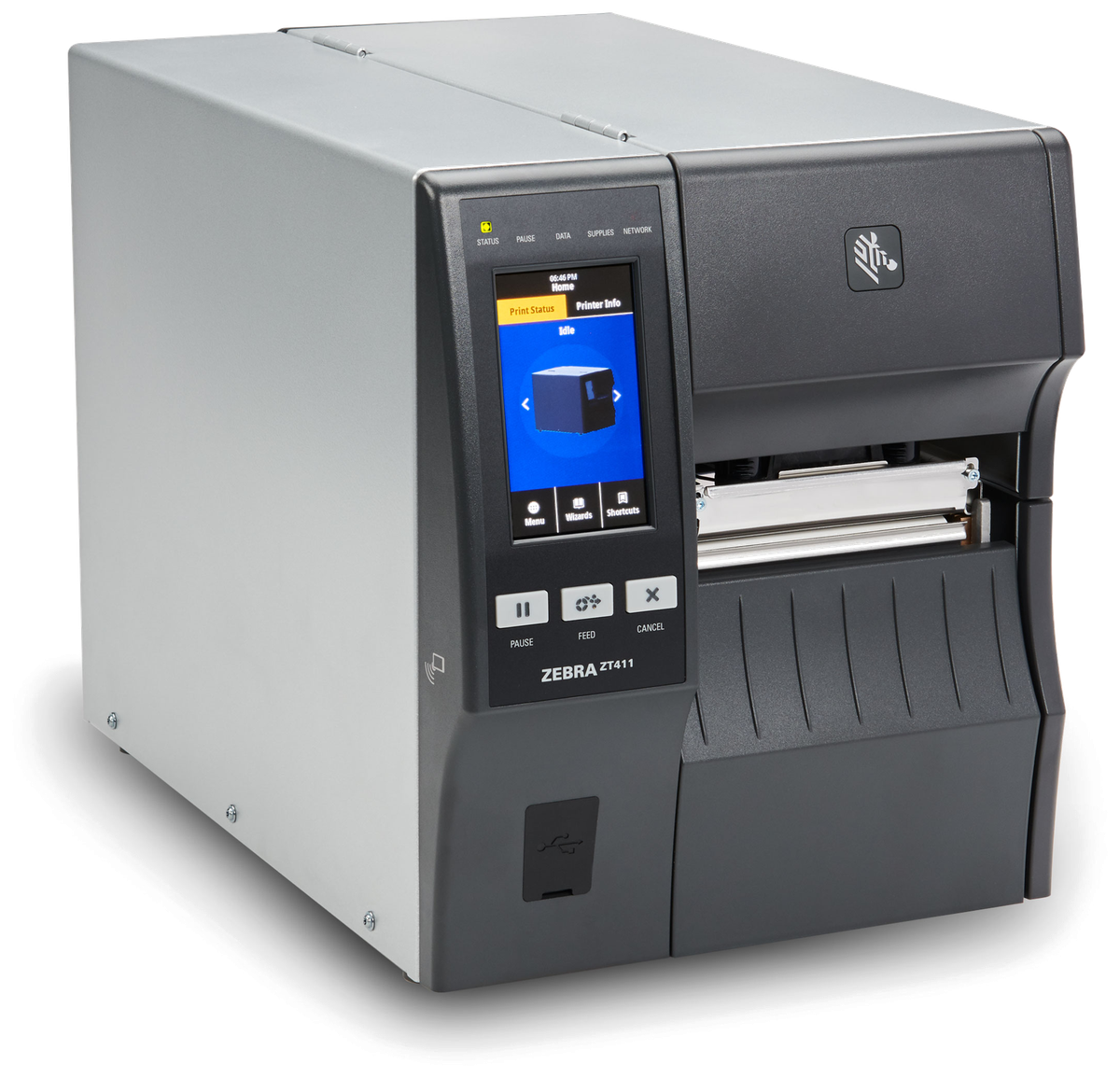
Barcode Printers
For controlled item, shelf, package or internal work identification. Match this print point to where and when the label is produced, then review print method, label size, connection, placement and media replenishment. Check a print sample on the intended surface before narrowing the printer category.

Receipt Printers
For authorised receipts and counter documents matched to the transaction setup. Match this print point to where and when the label is produced, then review print method, label size, connection, placement and media replenishment. Check a print sample on the intended surface before narrowing the printer category.

RFID Equipment
For assessed tag-and-reader workflows with defined read areas and controls. Validate this RFID step with representative tags, materials, read positions and the intended application. Record missed or unintended reads during the trial before deciding how RFID should complement barcode checkpoints.

Labels and Ribbons
For products, shelves, orders and assets matched to the surface and use. Use the label purpose required at this checkpoint to confirm size, material, adhesive and expected life against representative surfaces. If thermal-transfer printing is involved, check the ribbon together with the printer and label rather than as a separate purchase.
Labels and ribbons
Treat labels and ribbons as part of the working hardware system
A printer or mobile-printing decision is incomplete until the label is matched to the item, package, location or document used at this work point. Size, material, adhesive, surface, barcode layout and expected life all affect whether the identification remains usable.
For thermal-transfer printing, the ribbon also needs to suit the label material and printer configuration. Bring representative packaging, current labels and print samples so the printer, label and ribbon can be reviewed as one combination.
- Purpose and size:Define what the label identifies, the available space and the information or barcode it must carry.
- Surface and adhesive:Check cardboard, plastic, metal, reusable containers and any curved, cold or difficult surface.
- Environment and working life:Record temperature, moisture, abrasion, handling and how long the print must remain readable.
- Print method and ribbon:Confirm direct thermal or thermal transfer, then match the ribbon where thermal-transfer printing is used.
Store hardware fit
Test scanning, mobile work, printing and supplies as one kit
A store device should be assessed where it will actually be used. Check counter space, aisle movement, stockroom conditions, hands and carrying, screen visibility, wireless coverage, charging, cable routing, print position and the labels or paper required.
Use representative codes, items, packaging, labels and transactions during the review. Keep application and data ownership separate from the physical hardware assessment.

RFID and item identity boundary
Confirm the tag, item, read point and exception process first
RFID is not an automatic fit for every retail item or store. Confirm the item and packaging, tag placement, read area, nearby materials, required read event, permitted status update and handling of missed or duplicate reads through a representative test.
- Identity design:Define which physical unit the barcode or RFID reference represents.
- Read point:Set the authorised zone, action and expected result for each read.
- Environment test:Use representative products, packaging, fixtures and store conditions.
- Exception route:Assign missed, duplicate, wrong or unexpected identities for review.
Application and data boundary
Define what the device reads, displays and sends
Hardware does not by itself provide product, inventory, customer, order, payment, staff or task logic. Confirm the selected application, user permissions, authoritative system, interface, validation, network behaviour and exception owner for every transaction.
Device action
Scan, enter, display or print only the approved operation. Test this step with representative items and records from the required workflow. Confirm what the operator can decide here and which condition must be handed to an authorised reviewer.
Authoritative record
Identify which system owns each item, order, stock or task state. Use a small set of representative records to test the hand-off between capture and the business system. Confirm field ownership, accepted values and how rejected or incomplete records return to the responsible user.
Connection behaviour
Test unavailable networks, delayed records and reconnect handling. Keep the physical item, its identification and the resulting status connected throughout the process. If one element is missing, follow the page's exception route before the workflow continues.
Exception owner
Route rejected, duplicate or incomplete records to a responsible role. Turn the responsibility required at this checkpoint into a clear instruction for the relevant role. The user should know the required input, permitted decision and named escalation route before this task is added to daily work.
Secondary business-system layer
Use SME ERP only where a verified retail record needs it
When a supported SME ERP holds the relevant item, stock, purchasing, sales or fulfilment record, define a controlled hand-off from the selected store application. Hardware, labels and the work-point process remain the primary scope.
Scope the record
Confirm identifiers, fields, validation, permissions and authoritative status. The completed record should show the next user what was checked, what changed and what still requires attention, so the expected hand-off is clear at the real work point.
Scope the interface
Confirm timing, supported method, error handling and responsible owner. Map the identifiers and status fields required at this checkpoint to the existing source record before configuring an interface. Define validation, duplicate prevention and retry handling so a device submission does not create an ambiguous transaction.
Hong Kong store deployment
Prepare the site, store team and support route together
- Store walkthrough:Review counters, aisles, stockrooms, collection points and network coverage.
- Hardware and supplies:Confirm devices, accessories, charging, labels, ribbons and paper.
- Pilot and handover:Test representative work points and document operating ownership.
- Local support route:Use Technical Support and Easy Care where applicable.
Retail review inputs
Walk one item, order and staff task through the store
Work points and users
Counter, aisle, shelf, stockroom, packing area, collection point and responsible roles. Turn the responsibility required at this checkpoint into a clear instruction for the relevant role. The user should know the required input, permitted decision and named escalation route before this task is added to daily work.
Items and identifiers
Representative products, packaging, barcodes, tags, locations and order references. Test representative barcodes in the work position required at this checkpoint, including the normal scan distance, label presentation and host connection. This confirms whether the scanner category fits the actual item flow before individual products are compared.
Devices and supplies
Current scanners, mobile devices, printers, accessories, labels, ribbons and paper. Use the output required at this checkpoint to assess the print point, expected workload and operator handling. The printer, connection and consumables should be tested as one setup with the real label format.
Applications and exceptions
Existing systems, required records, network conditions and common failure paths. Use a small set of representative records to test the hand-off between capture and the business system. Confirm field ownership, accepted values and how rejected or incomplete records return to the responsible user.
Frequently asked questions
Retail technology hardware planning questions
Where should a retail technology project start?
Start with one real store journey: identify the item or customer request, list each work point, define the required record and exception owner, then review hardware categories.
Which hardware categories are commonly reviewed for retail?
Depending on the work point, the review may include barcode scanners, mobile computers, barcode printers, receipt printers, RFID equipment, labels and ribbons. Suitability must be checked against the actual workflow and environment.
Can the same device cover checkout, inventory and fulfilment?
Not automatically. Counter, aisle, stockroom and order-preparation tasks can require different forms, accessories, scanning positions, power arrangements and applications.
When should a retailer consider RFID?
Consider it only after defining the item, tag placement, read point, expected event and exception handling, followed by testing with representative products and store conditions.
Does the retail hardware require SME ERP?
No. SME ERP is a secondary option only where a supported item, stock, purchasing, sales or fulfilment record needs a verified hand-off. The store hardware and workflow can be scoped separately.
What should we prepare for an Easy Scan store review?
Prepare the store layout, work-point list, sample items and codes, current devices, labels or paper, network notes, application owners and common exceptions.
Review your retail hardware and store workflow with Easy Scan
Share the store zones, user roles, products, identifiers, print needs, current systems and priority workflow. We can then discuss suitable product categories and verification steps.
