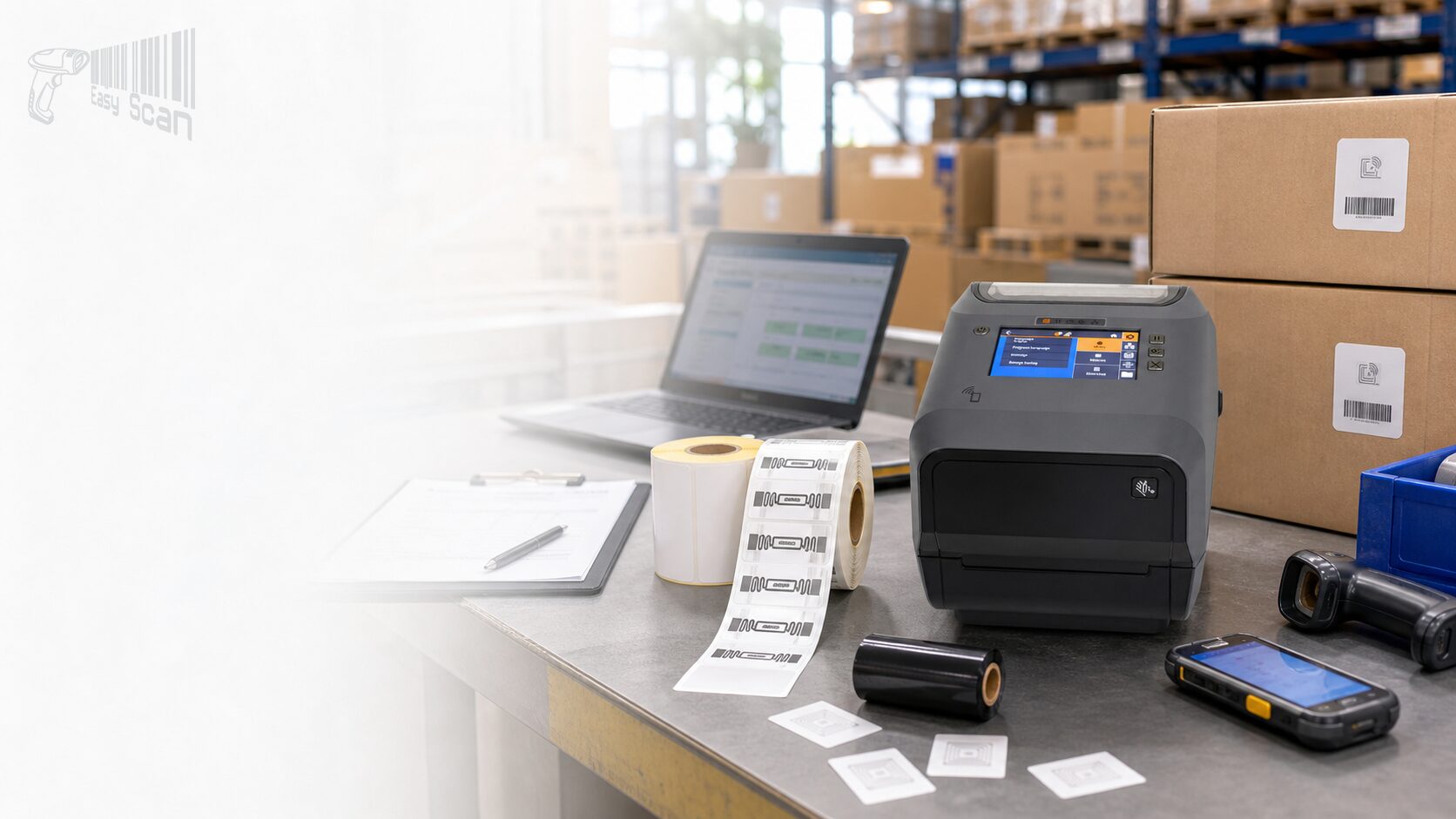
Zebra ZD621R RFID Desktop Barcode Printer

Zebra ZD621R is a 4-inch RFID thermal transfer desktop printer / encoder for asset tracking, inventory identification and barcode + RFID labelling workflows. Confirm RFID inlay, label size, resolution, connectivity and system compatibility before configuration.

Categories: , ,

RFID Barcode Printer / Zebra ZD621R

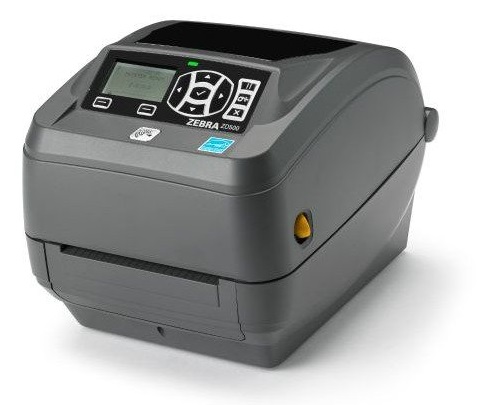
Zebra ZD621R RFID Desktop Barcode Printer

The Zebra ZD621R is a 4-inch RFID thermal transfer desktop printer for businesses that need to print barcode labels and encode UHF RFID tags in the same workflow. It is commonly considered for asset tracking, inventory identification, retail item labelling and barcode + RFID tagging projects. Before choosing a configuration, confirm the RFID inlay, label size, print volume, resolution, network interface and system compatibility.

Product Overview

A 4-inch premium desktop printer for RFID label printing and encoding

The ZD621R is based on Zebra’s ZD600 Series desktop printer platform and adds RFID reader / encoder capability plus a 4.3-inch full-colour touch LCD. It is designed for workflows where a scannable barcode, RFID data and printed label content need to be prepared together. Zebra’s product information lists thermal transfer roll printing, 203 dpi / 300 dpi resolution, up to 8 ips / 6 ips print speed, USB, USB Host, Ethernet, Serial, BLE and optional Wi-Fi / Bluetooth connectivity. RFID support includes UHF EPC Gen 2 V2.1, ISO/IEC 18000-63 and RAIN RFID. For Hong Kong warehouse, retail, logistics and asset-management teams, the key decision is whether the RFID tag, label material, encoding requirement and system workflow are already clear enough for configuration.


Quick Fit

When ZD621R is worth discussing

Good fitYou need 4-inch RFID label / tag printing and encoding from a desktop workstation.
Check firstRFID inlay, tag pitch, label width, data format, read-write target and encoding rules.
May not fitYou need high-volume industrial output, mobile printing or ordinary barcode labels without RFID.

Suitable / Not Suitable

Recommended use boundaries

Suitable

  • Asset labels, inventory labels, item identification and barcode + RFID tagging.
  • Desktop workstations that need a 4-inch thermal transfer RFID printer / encoder.
  • Teams that value an LCD interface for setup, status prompts and daily operation.
  • Deployments requiring USB, Ethernet, Serial or optional Wi-Fi / Bluetooth connectivity.

May not be suitable

  • Ordinary direct thermal shipping labels without RFID encoding requirements.
  • High continuous daily print volumes that may need an industrial RFID printer.
  • Projects where RFID tags, inlay placement and data format have not been confirmed.
  • Enquiries requiring final price, stock or warranty terms before quotation confirmation.

Key Features

Verified features that matter for buyers


RFID print / encode

Supports UHF EPC Gen 2 V2.1, ISO/IEC 18000-63 and RAIN RFID for label, tag and wristband encoding workflows.

4-inch thermal transfer

The ZD621R is a 4-inch thermal transfer roll RFID printer for durable labelling applications.

203 / 300 dpi

Choose resolution based on label detail, barcode density, font size and RFID media requirements.

Up to 8 ips / 6 ips

Zebra lists up to 8 ips for 203 dpi and up to 6 ips for 300 dpi, subject to media and application testing.

LCD touch display

RFID models include a 4.3-inch full-colour touch LCD for setup and status visibility.

Connectivity options

USB, USB Host, Ethernet, Serial and BLE are supported, with Wi-Fi 5 / Wi-Fi 6 and Bluetooth options.

ZPL / EPL

ZPL II and EPL2 support can help teams keep Zebra label formats or legacy applications.

RFID traceability

Technical specifications list RFID job monitoring, RFID logging and RFID ZPL command support.

Applications

Common Hong Kong B2B use cases


01

Asset tracking

Print barcode + RFID labels for tools, IT assets, equipment and fixed assets.

02

Warehouse inventory

Prepare RFID tags for receiving, put-away, stocktaking or inventory identification.

03

Retail labelling

Support item labelling, faster stock counts or error-reduction projects.

04

Logistics tracking

Combine visible barcode scanning with non-line-of-sight RFID reading where suitable.

Accessories / Consumables / Software

Confirm media, accessories and software before ordering

RFID printer success depends on the printer, RFID label / tag, ribbon, inlay placement, encoding settings, connectivity and system format working together. For a ZD621R enquiry, prepare label size, RFID tag type, expected print volume, cutter / peeler requirement, wireless requirement and the WMS / ERP / POS or label software environment.

Selection Guide

Four details to prepare before configuration


  1. Label and RFID tagConfirm label width, length, material, ribbon, inlay placement and whether Zebra Certified Supplies are required.
  2. Print and resolutionReview barcode density, text size, RFID tag size and speed expectations before choosing 203 dpi or 300 dpi.
  3. Connectivity and managementConfirm USB, Ethernet, Serial, Wi-Fi / Bluetooth, Printer Setup Utility or management-tool requirements.
  4. System and encodingCheck ZPL / EPL label format, RFID encoding commands, middleware and WMS / ERP / POS workflow.

Model Comparison

ZD621R vs ZD611R vs ZD621

Model Positioning Print technology Resolution Best-fit decision
ZD621R 4-inch RFID desktop printer / encoder Thermal Transfer Roll 203 dpi / 300 dpi Prioritise when 4-inch RFID label / tag printing and encoding is required.
ZD611R 2-inch RFID desktop printer / encoder Thermal Transfer Roll 203 dpi / 300 dpi Compare when label size is smaller or workstation space is limited.
ZD621 4-inch premium desktop printer Direct Thermal / Thermal Transfer 203 dpi / 300 dpi Compare when barcode labels are required but RFID encoding is not.

Buying Pitfalls

Common procurement risks


Buying the printer before checking RFID tags

RFID inlay, pitch, label material and read-write requirements should be tested before final configuration.

Ignoring 203 / 300 dpi differences

Small text, dense barcodes or compact labels may need 300 dpi; speed-first applications may need a different balance.

Missing interface and system checks

USB, Ethernet, Serial, Wi-Fi, ZPL / EPL and RFID commands must match the existing workflow.

Treating RFID like ordinary barcode printing

RFID involves tags, printer settings, middleware and the operating environment; provide the full scenario for review.

Why Buy from EasyScan

Local support for RFID printer, media and deployment decisions

Easy Scan is a Zebra Premier Solution Partner and can help Hong Kong businesses review RFID label specifications, print volume, Part Number choices, accessories, consumables and system connectivity before selecting the ZD621R. This helps reduce the risk of choosing the wrong model or pairing the printer with unsuitable RFID media.


Specifications

ZD621R Key Technical Specifications

The rows below use buyer-useful details confirmed by Zebra’s product page, RFID spec sheet, technical specifications and user guide. Final configuration should still be checked by Part Number.

Product type 4-inch RFID desktop thermal transfer printer / encoder
Print technology Thermal Transfer Roll
RFID support UHF EPC Gen 2 V2.1, ISO/IEC 18000-63 and RAIN RFID
RFID module Integrated Zebra RE40 RFID Reader / Encoder
Minimum tag pitch 0.6 in. / 16 mm
Resolution 203 dpi (8 dots/mm); 300 dpi (12 dots/mm)
Maximum print speed 203 dpi up to 8 ips / 203 mm/s; 300 dpi up to 6 ips / 152 mm/s
Maximum print width 203 dpi: 4.09 in. / 104 mm; 300 dpi: 4.27 in. / 108 mm
Display 4.3 in. full-colour touch LCD with 3-button user interface
Standard connectivity USB 2.0, USB Host, Ethernet, Serial, Bluetooth Low Energy; wireless depends on configuration
Wireless options Wi-Fi 6 (802.11ax) with Bluetooth 5.3; Wi-Fi 5 (802.11ac) with Bluetooth 4.2 / 4.1 option by source/configuration
Printer languages ZPL II, EPL2, Web View; ZBI 2.0 field installed via activation file
Media width ZD621t technical specifications: 0.585-4.65 in. / 15-118 mm
Label length Minimum 0.25 in. tear; 0.5 in. with cutter / peeler; maximum 39 in. / 991 mm
Physical dimensions ZD621 thermal transfer model: 10.5 in. L x 8.0 in. W x 7.5 in. H / 267 x 202 x 192 mm
Weight ZD621 thermal transfer model: 5.5 lbs / 2.5 kg
Operating environment 40°F to 105°F / 4.4°C to 41°C; 10-90% non-condensing humidity
Power Auto-ranging external power supply; 24 VDC 3.125A output; 100-240 VAC 50-60 Hz input
In the box Printer, power supply and power cord, USB cable, quick start guide, empty ribbon take-up cores
Software / management Zebra DNA software suite / Link-OS environment; Printer Profile Manager Enterprise mentioned in Zebra spec sheet

FAQ

ZD621R FAQ

How is ZD621R different from the standard ZD621?

The ZD621R is an RFID thermal transfer printer / encoder for printing and encoding RFID labels or tags. Standard ZD621 models are for barcode label printing and should not be treated as RFID encoding models.

Will the ZD621R work with every RFID tag?

No. RFID tag compatibility should be checked against the inlay, tag pitch, label material, encoding data and application environment. Testing is recommended before deployment.

Should we choose 203 dpi or 300 dpi?

It depends on barcode density, text size, label dimensions and speed expectations. Small labels, fine text or dense barcodes often justify reviewing a 300 dpi configuration.

What should we prepare before enquiring?

Prepare the use case, label size, RFID tag / inlay details, expected print volume, system or label software, connectivity needs and whether cutter or peeler options are required.

Enquiry

Need to confirm whether the Zebra ZD621R fits your RFID labelling workflow?

Share your label size, RFID tag details, print volume, system and connectivity requirements. Easy Scan can help narrow down the configuration and enquiry path.

Brand

Zebra

Product Type

RFID desktop barcode printer

Series

ZD600 Series

Model

ZD621R

Print Method

Thermal Transfer RFID

Print Resolution

203 dpi / 300 dpi

Max Print Width

4.09 in. / 104 mm

Max Print Speed

Up to 8 ips / 203 mm/s at 203 dpi; up to 6 ips / 152 mm/s at 300 dpi

Connectivity

USB 2.0, USB Host, Ethernet, Serial, Bluetooth Low Energy; optional Wi-Fi / Bluetooth by configuration

RFID Support

UHF EPC Gen 2 V2.1, ISO/IEC 18000-63, RAIN RFID

Suitable Application

Barcode + RFID label printing and encoding workflows

Part Number

The Part Number and Description values below are kept verbatim for configuration checks during enquiry.

ZD621R RFID standard configurations

Part Number Description
ZD6A142-30GFR2EZ Thermal Transfer Printer (74/300M) ZD621R, Color Touch LCD; 203 dpi, USB, USB Host, Ethernet, Serial, BTLE5, ROW, RFID – UHF, India Cord, Swiss Font, EZPL
ZD6A142-30PFR2EZ Thermal Transfer Printer (74/300M) ZD621R, Color Touch LCD; 203 dpi, USB, USB Host, Ethernet, Serial, BTLE5, ROW, RFID – UHF, APAC Cord bundle (EU, UK, AUS, JP), Swiss Font, EZPL
ZD6A142-30PRR2EZ Thermal Transfer Printer (74/300M) ZD621R, Color Touch LCD; 203 dpi, USB, USB Host, Ethernet, Serial, 802.11ax, BT5.2, ROW, RFID – UHF, APAC Cord bundle (EU, UK, AUS, JP), Swiss Font, EZPL
ZD6A143-30GFR2EZ Thermal Transfer Printer (74/300M) ZD621R, Color Touch LCD; 300 dpi, USB, USB Host, Ethernet, Serial, BTLE5, ROW, RFID – UHF, India Cord, Swiss Font, EZPL
ZD6A143-30PFR2EZ Thermal Transfer Printer (74/300M) ZD621R, Color Touch LCD; 300 dpi, USB, USB Host, Ethernet, Serial, BTLE5, ROW, RFID – UHF, APAC Cord bundle (EU, UK, AUS, JP), Swiss Font, EZPL
ZD6A143-306FR2EZ Thermal Transfer Printer (74/300M) ZD621R, Color Touch LCD; 300 dpi, USB, USB Host, Ethernet, Serial, BTLE5, ROW, RFID – UHF, Australia Cord, Swiss Font, EZPL
ZD6A142-307LR2EZ Thermal Transfer Printer (74/300M) ZD621, Color Touch LCD; 203 dpi, USB, USB Host, Ethernet, Serial, 802.11ac, BT4, All Countries Except USA, Canada and Japan, RFID – UHF, Taiwan Cord, Swiss and Traditional Chinese Fonts, EZPL
ZD6A142-30GLR2EZ Thermal Transfer Printer (74/300M) ZD621R, Color Touch LCD; 203 dpi, USB, USB Host, Ethernet, Serial, 802.11ac, BT4, ROW, RFID – UHF, India Cord, Swiss Font, EZPL
ZD6A142-30PLR2EZ Thermal Transfer Printer (74/300M) ZD621R, Color Touch LCD; 203 dpi, USB, USB Host, Ethernet, Serial, 802.11ac, BT4, ROW, RFID – UHF, APAC Cord bundle (EU, UK, AUS, JP), Swiss Font, EZPL
ZD6A143-30PLR2EZ Thermal Transfer Printer (74/300M) ZD621R, Color Touch LCD; 300 dpi, USB, USB Host, Ethernet, Serial, 802.11ac, BT4, ROW, RFID – UHF, APAC Cord bundle (EU, UK, AUS, JP), Swiss Font, EZPL

Accessories / Consumables

The rows below group relevant accessories and repair parts by buyer-useful type. Part Number and Description cells are kept verbatim for checking.

Power / connectivity / media handling

Part Number Description
P1079903-026 KIT, POWER SUPPLY, 75W, 24V, US Cord, EU Cord, GX420D, GX420T, GK888E, GK420E, GX430T, ZD410D, ZD420C, ZD420D, ZD420T, ZD500, ZD500R, ZD620D, ZD620T, ZD421C, ZD621D, ZD621T, ZD621R
P1080383-234 Kit Attached Power Supply ZD420T ZD620T, ZD621T, ZD621R, ZD421C
P1112640-239B Kit, Wireless Module, WiFi 802.11ac, MFI 3.0, Bluetooth 4.1, Japan, ZD621T, ZD421C, ZD621R
P1080383-022 Kit, Media Core Adaptors for 1.5, 2 & 3 Diameter Media Cores, (set of 2 each), ZD420C, ZD420T, ZD620T, ZD621T, ZD421C, ZD621R, ZD421C, ZD621T, ZD621T-R
P1112640-054 Kit, Media Core Adaptors for 1.5, 2 & 3 Diameter Media Cores, (set of 2 each), ZD411D, ZD411T, ZD611D, ZD611T, ZD611T-R, ZD421C, ZD421D, ZD421T, ZD621D, ZD621T, ZD621T-R

Repair parts and RFID parts

Part Number Description
P1112640-070 Kit, Main Logic Board USB, USB Host, Bluetooth, Modular Connectivity Slot, the board included in this kit allows firmware downgrades to occur, ZD421D, ZD621D, ZD421T, ZD621T, ZD621R
P1112640-201 Kit, Hinge and Rear Hinge Cover for models with LCD, ZD621T, ZD621R
P1112640-249 Kit, Shipping Pack, ZD421T, ZD621T, ZD621T-R
P1112640-500 Kit, Cover Assembly for models with LCD (includes Media Window), ZD621R
P1112640-501 Kit, Print Mechanism 203dpi, ZD621R
P1112640-502 Kit, Print Mechanism 300dpi, ZD621R
P1112640-503 Kit, Replacement Cover for RFID board (radome), ZD621R
P1112640-504 Kit, Replacement RFID PCBA and Hardware, ZD621R

Resources

Certificates

Easy Scan is a Zebra Premier Solution Partner and can help Hong Kong businesses review ZD621R RFID printer requirements, media, Part Number choices and deployment needs.


View Easy Scan certificate page

Video

The videos below are from Zebra Technologies and cover ZD421 / ZD621 family connectivity, Print Touch, calibration, media changes and the battery option.

FAQ

Does the ZD621R require specific RFID labels?

Yes. Inlay, tag pitch, material and application requirements should be checked; label size alone is not enough.

Can the ZD621R be used for ordinary barcode labels?

It is an RFID thermal transfer printer / encoder. If RFID encoding is not required, compare the standard ZD621 or another barcode printer.

Does it support Wi-Fi?

Zebra lists Wi-Fi 5 / Wi-Fi 6 and Bluetooth options, but the wireless module depends on the selected Part Number.

Does it support cutter or peeler options?

Official information lists field-installable cutter and peeler / dispenser options; configuration should be checked by application.

Does it support ZPL?

Zebra technical specifications list ZPL II and RFID ZPL commands for Zebra label-format workflows.

How should RFID encoding errors be handled?

Check RFID tag type, inlay placement, encoding commands, media calibration and printer settings. Provide error messages and media details when enquiring.

Can Easy Scan help match labels and ribbons?

Easy Scan can help narrow down options based on use case, label material, RFID tag, print volume and durability requirements, subject to final configuration checks.

Are price, stock or warranty details available here?

This page does not publish unverified price, stock or warranty terms. Please enquire for quotation and service terms.

Leave Your Message

    Go to Top