Zebra AI Data Capture 4.0
What Can Zebra Mobile Computers Do with AI Data Capture 4.0?
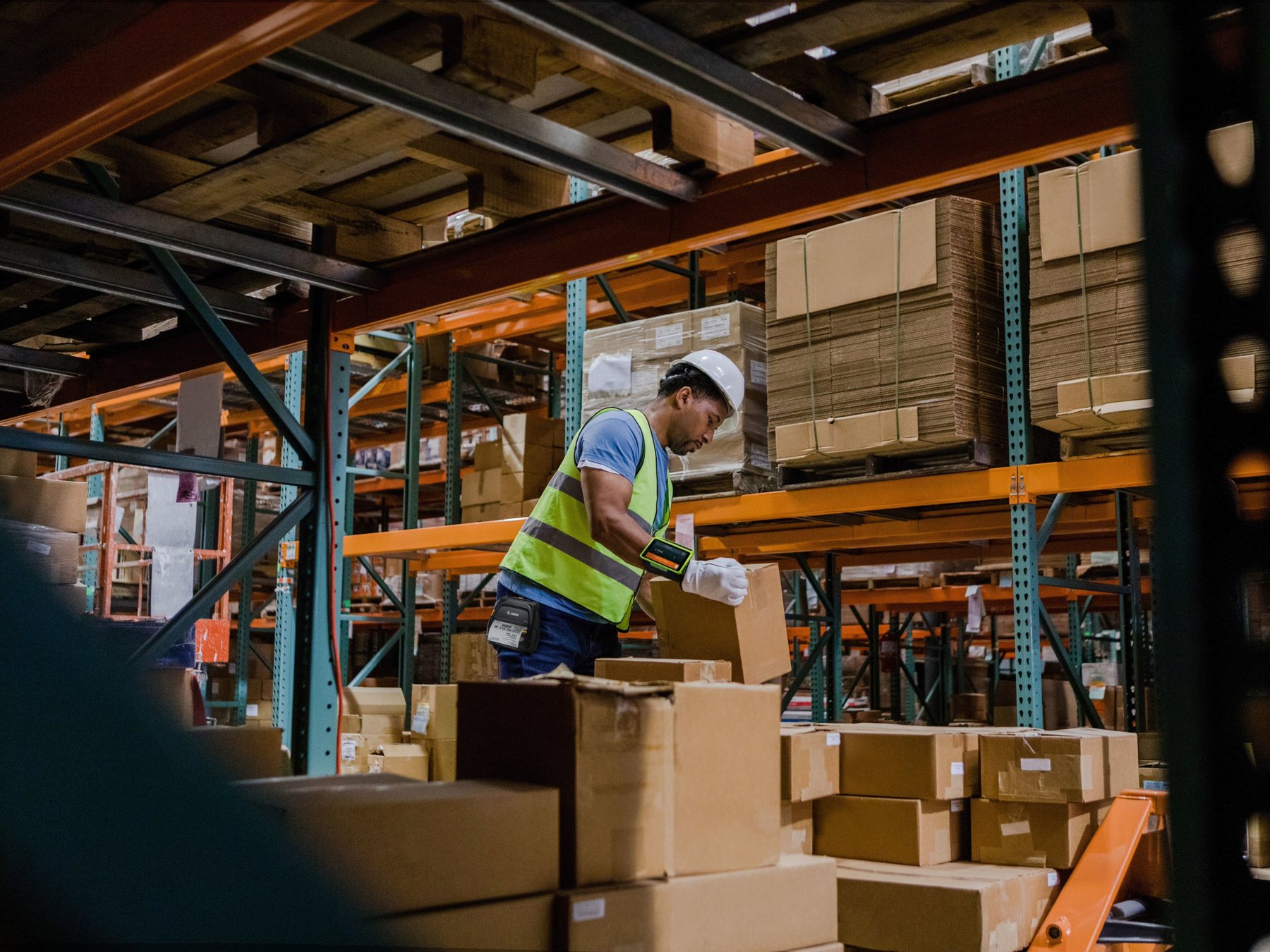
A supported Zebra mobile computer can do more than scan one barcode at a time. With an Android application built on Zebra AI Data Capture SDK 4.0, its camera can locate multiple barcodes, recognise products and shelves, capture printed text, guide the user on screen, check delivery photos, redact sensitive information and run approved custom vision models.
More than single scanning
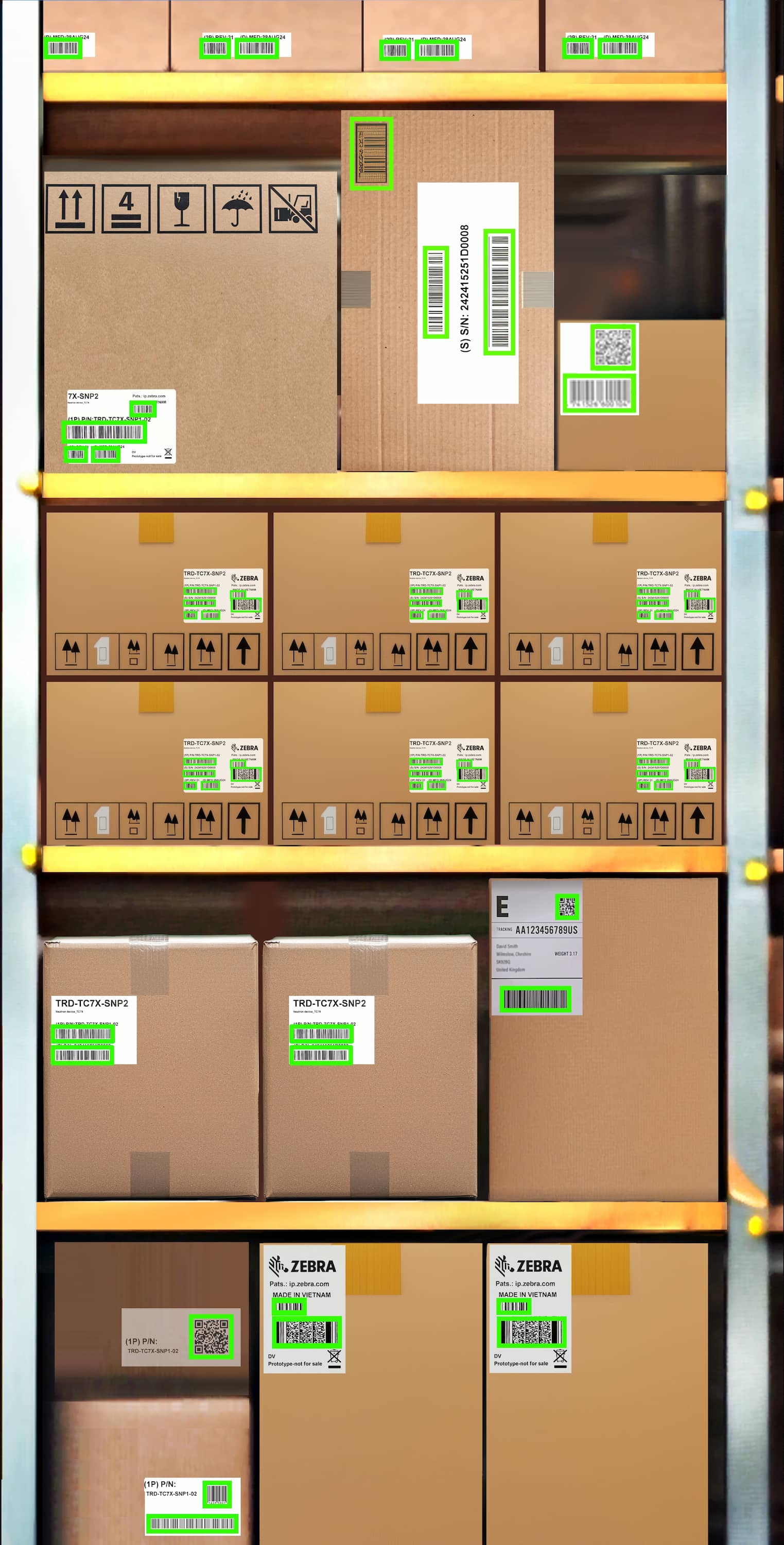
See many barcodes in one camera view
Useful when a worker needs to find labels across a rack, carton group, pallet position or document instead of aiming at one code at a time.
Retail computer vision
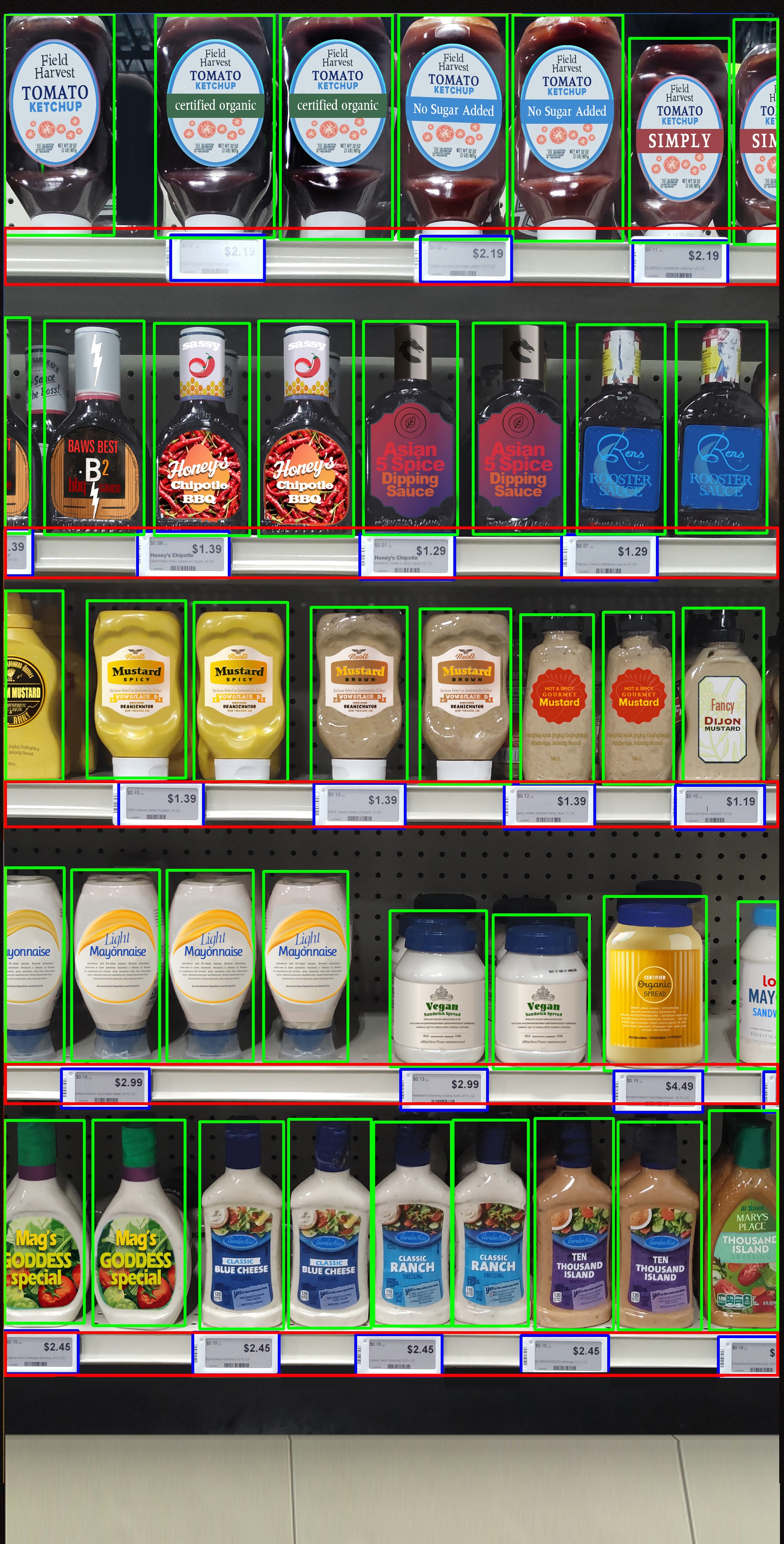
Locate products and shelf labels
A retail application can use the camera view to detect products, shelves, shelf labels and peg labels before applying its business rules.
Printed-text capture
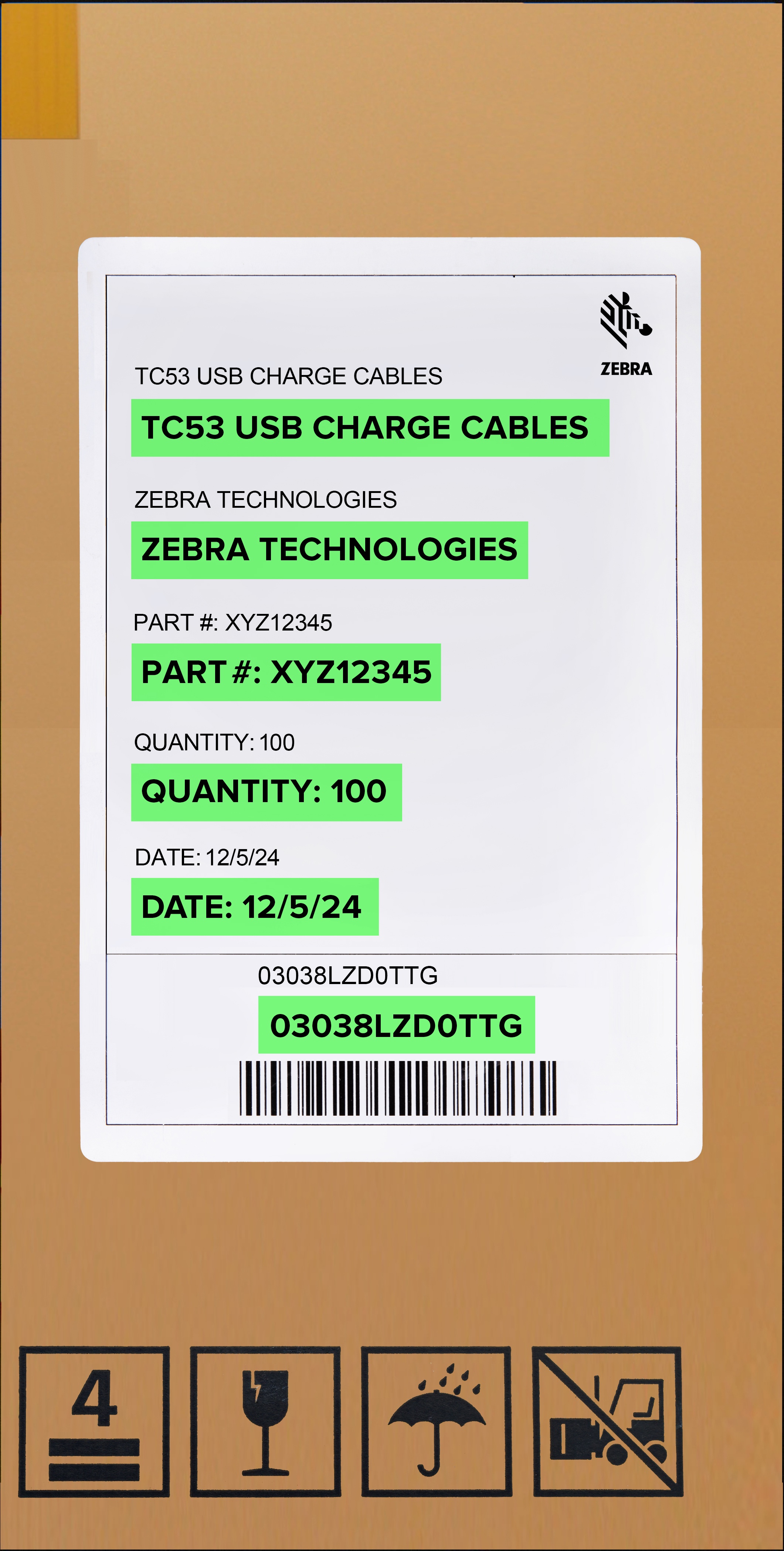
Read text that is not stored in a barcode
Text OCR can help an application capture printed references, quantities, descriptions or dates when the required value is visible as text.
Function overview
Eight ways Zebra AI Data Capture can extend a PDA workflow
| Function | What the PDA application can do | Example frontline use |
|---|---|---|
| Barcode Decoder | Locate and decode 1D and 2D barcodes from a camera image, including scenes with multiple codes. | Find carton, serial-number or location labels across one view. |
| AI Barcode Finder | Guide a user towards a target barcode in a scene. | Find the required parcel or asset among similar labelled items. |
| Product and Shelf Recognizer | Detect products, shelves, shelf labels and peg labels for retail applications. | Support shelf checks, product-location tasks or store audits. |
| Text OCR | Recognise printed words and group results into lines or paragraphs. | Capture references, quantities, descriptions or dates from labels. |
| Entity tracking and viewfinder | Display visual feedback for detected, selected, decoded or pending items. | Show workers what has already been captured and what remains. |
| Image Attributes Detector | Check image qualities or content such as blur and required object presence. | Prompt a delivery driver to retake an unsuitable proof photo. |
| Image Transform Detector | Transform images and redact detected sensitive elements such as text, barcodes or people. | Prepare photos for a controlled operational record. |
| Custom Detector | Connect an approved third-party machine-learning model to the Zebra tracking flow. | Recognise an organisation-specific object or condition. |
Barcode functions
Use the Zebra PDA camera to find, decode and guide barcode capture
Instead of treating the PDA camera as a simple trigger, an application can process a wider scene, display several recognised codes and help the operator select the correct item.
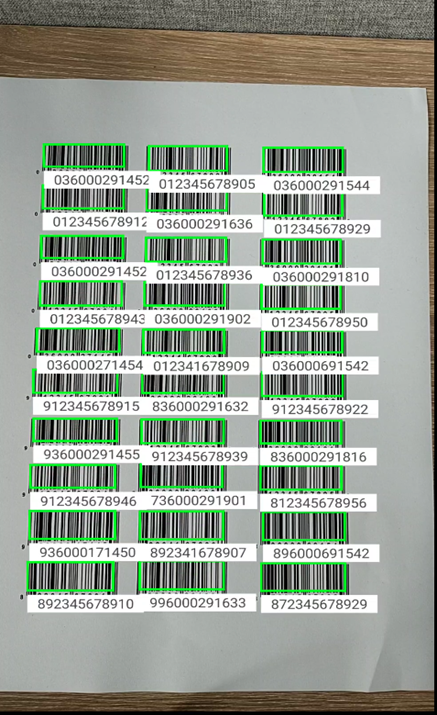
Decode multiple labels together
This can reduce repeated aiming when labels are grouped on a sheet, rack, carton area or batch of items. The application must still decide which decoded values are relevant.
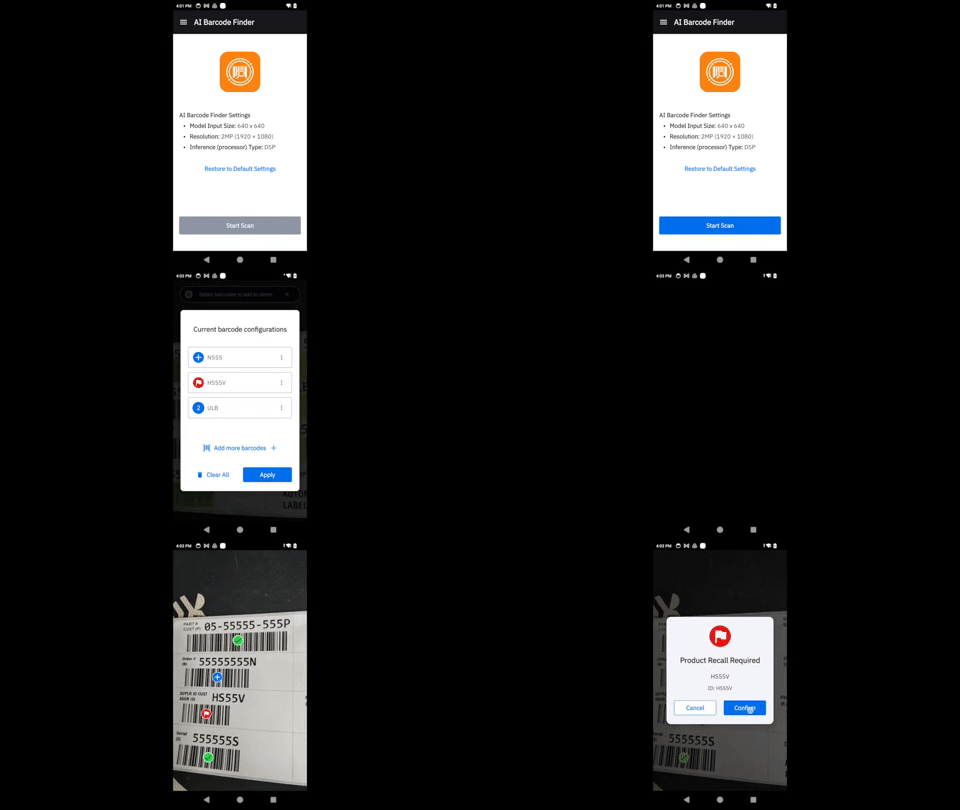
Guide the user to a target barcode
AI Barcode Finder can support workflows where the operator knows which item is required but needs help locating its label in a busy scene.
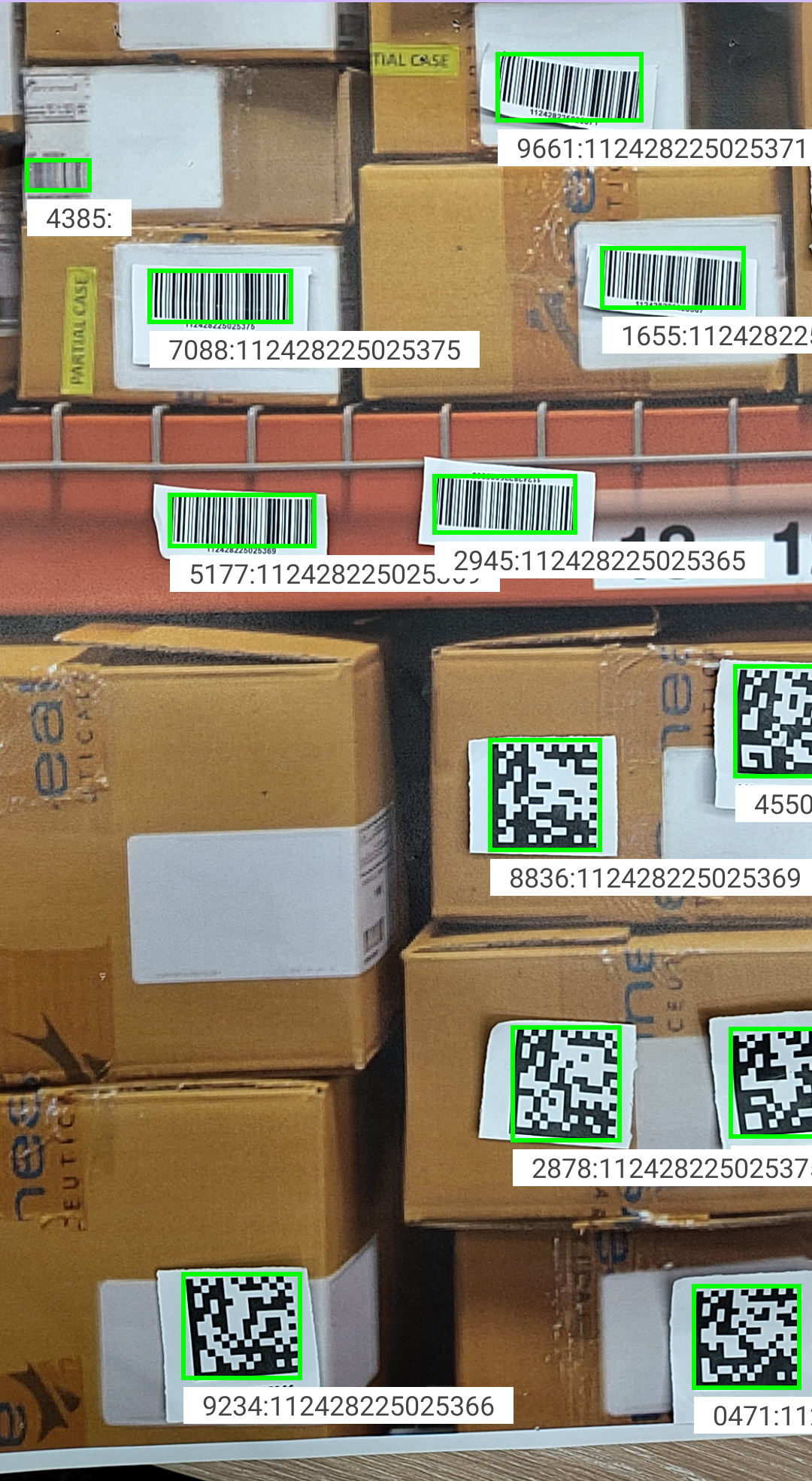
Keep results visible while the camera moves
Tracking components can retain on-screen feedback for detected items so the application can show decoded, selected or unresolved entities as the user works.
Retail functions
Recognise shelf structure and enrolled products through the PDA camera
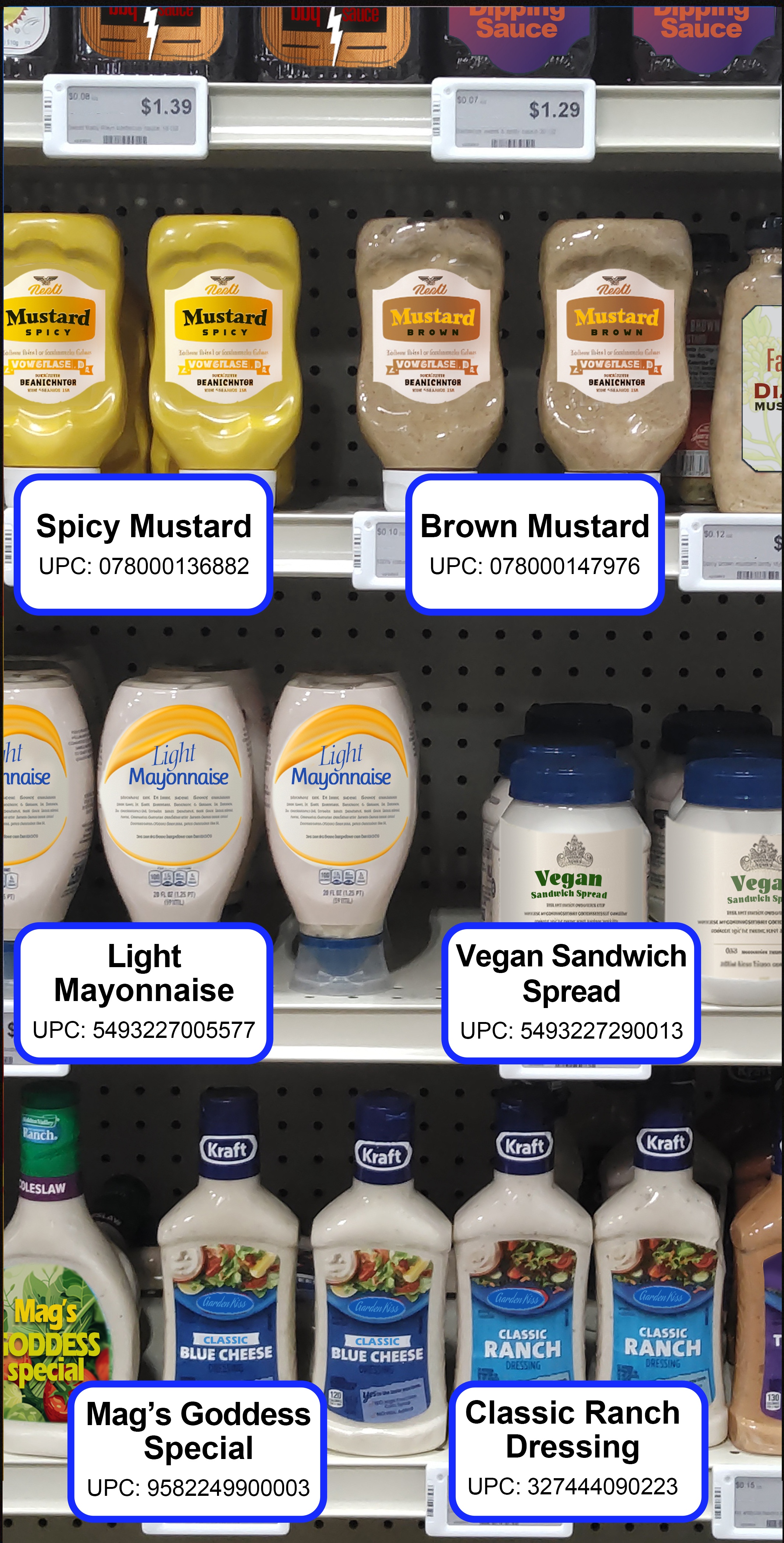
Recognise enrolled products
When the product set and model are prepared for the application, the PDA camera can help identify products and return associated recognition results for the workflow.
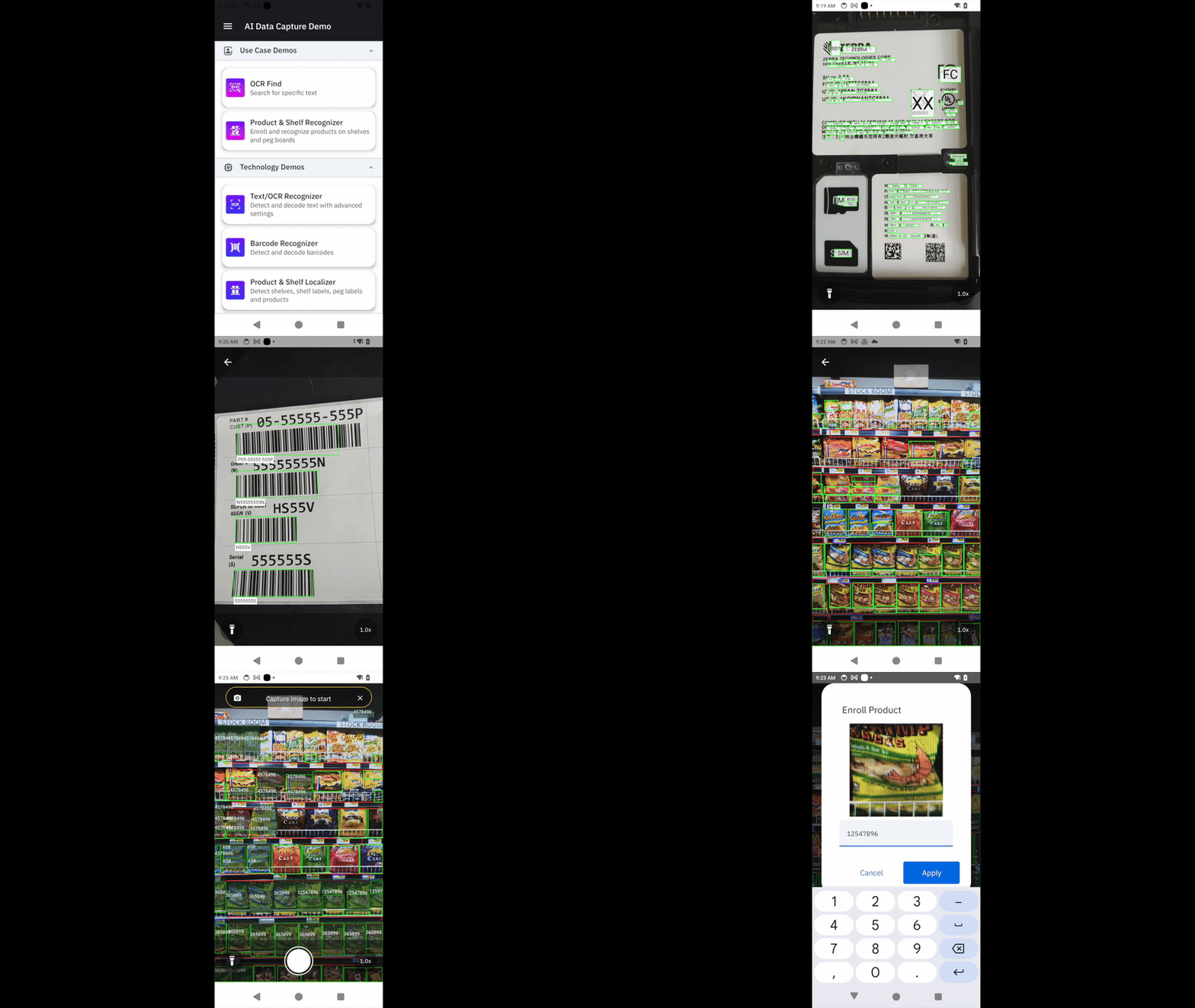
Combine the function with a store task
The value comes from the application around the model: for example, deciding which shelf to inspect, which result needs confirmation and what record should be updated.
Text OCR
Capture printed information that a barcode does not contain
Text OCR can recognise printed words and return them to the Android application. This may help when a carton, document or label shows a reference, quantity, description, date or other value as visible text.
- Define the exact fields the user needs.
- Test the real fonts, layouts, languages, contrast and lighting.
- Show the recognised result for confirmation when accuracy matters.
- Provide a manual correction or exception route.
What OCR does not decide
The model can return recognised text, but the business application must decide which field it belongs to, whether the result is acceptable and where the data should be sent.
Guided user experience
Show the operator what the PDA has detected and what to do next
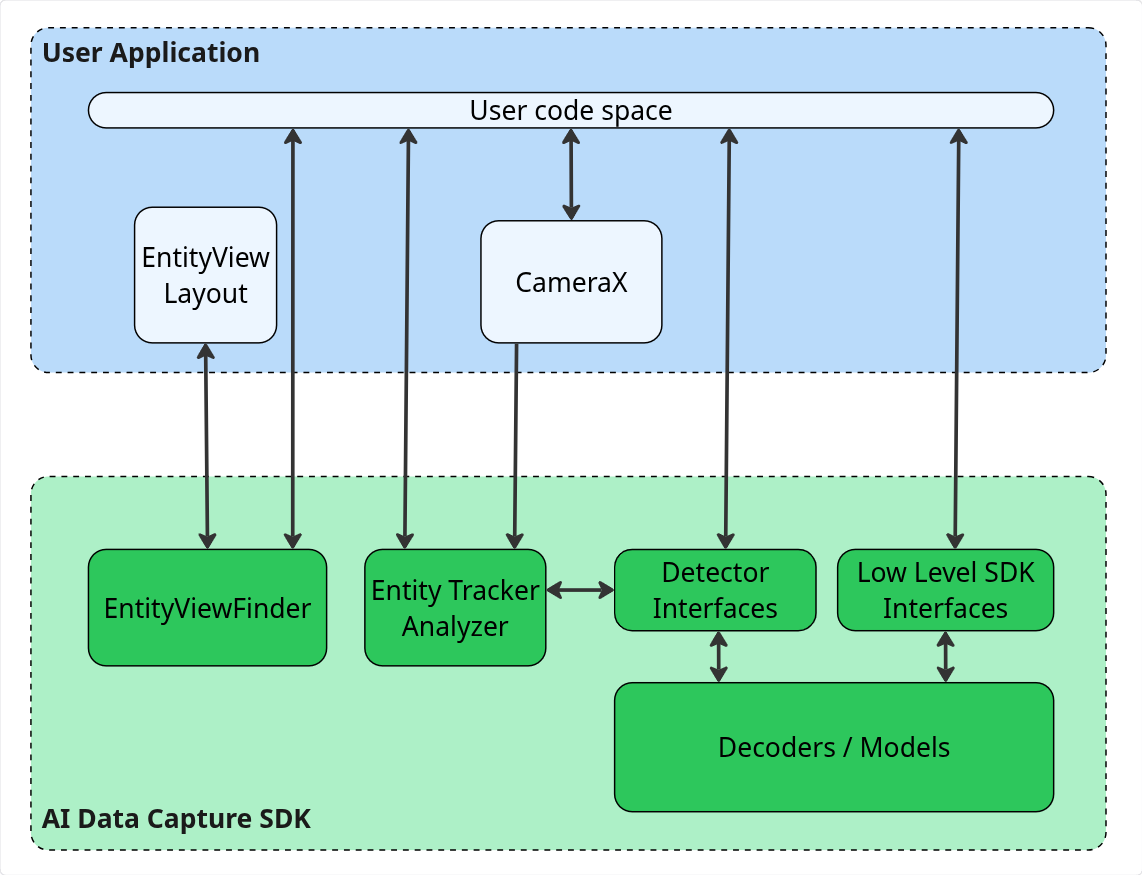
EntityViewfinder and EntityTrackerAnalyzer help application developers create a capture screen with visual feedback. A user can see which object is detected, selected, decoded or still waiting for action instead of relying on a simple success beep.
| On-screen feedback | Why it helps the worker |
|---|---|
| Detected outline | Shows which label, object or region the camera has found. |
| Decoded state | Helps avoid scanning the same item again. |
| Selected target | Lets the application focus on the item required by the task. |
| Retry prompt | Gives the worker a clear next step when the result is incomplete. |
Three camera-based capture functions
Capture barcodes, shelf data and printed text from one PDA camera view
Zebra AI Data Capture 4.0 can analyse different types of information in a camera image, but these three functions return different results. Start with what the frontline task needs to find, then define how the application should validate and use that result.
Barcode Localizer
Locate multiple 1D and 2D barcodes in one view
Barcode Localizer first finds barcode positions in the image. The application can then pass the required regions to Barcode Decoder. A worker does not have to aim at every label individually when processing one shelf, a group of cartons or a document containing several barcodes.
- Suitable workflows: receiving, stocktaking, pick verification, carton or document label checks.
- The application must define: which barcodes are required, whether the set is complete and where the result should be recorded.
- Pilot tests should cover: barcode size, distance, glare, damage, obstruction and the number of labels in one view.
Product and Shelf Localizer
Separate products, shelves, shelf labels and peg labels
This function marks the positions of products and shelf elements in the camera view, giving a store application the location of each item. If the workflow needs to identify the actual product, the application can pass the localised region to the product-recognition function.
- Suitable workflows: locating a product, checking displays, restock prompts and shelf-label verification.
- The application must define: which shelf to inspect, which products are enrolled and when a result needs manual confirmation.
- Pilot tests should cover: packaging changes, similar designs, lighting, glare, obstruction, aisle width and capture distance.
Text OCR
Turn printed label content into text the application can use
Text OCR detects and recognises printed text in an image. When a reference number, quantity, description or date appears only on the label and is not contained in the barcode data, the application can capture the text and validate it against field and format rules.
- Suitable workflows: receiving-document input, carton-label checks and batch or date capture.
- The application must define: which field each text region belongs to, acceptable formats and when the user must correct a result.
- Pilot tests should cover: real fonts, sizes, orientations, languages, layouts, contrast and operational lighting.
Custom vision
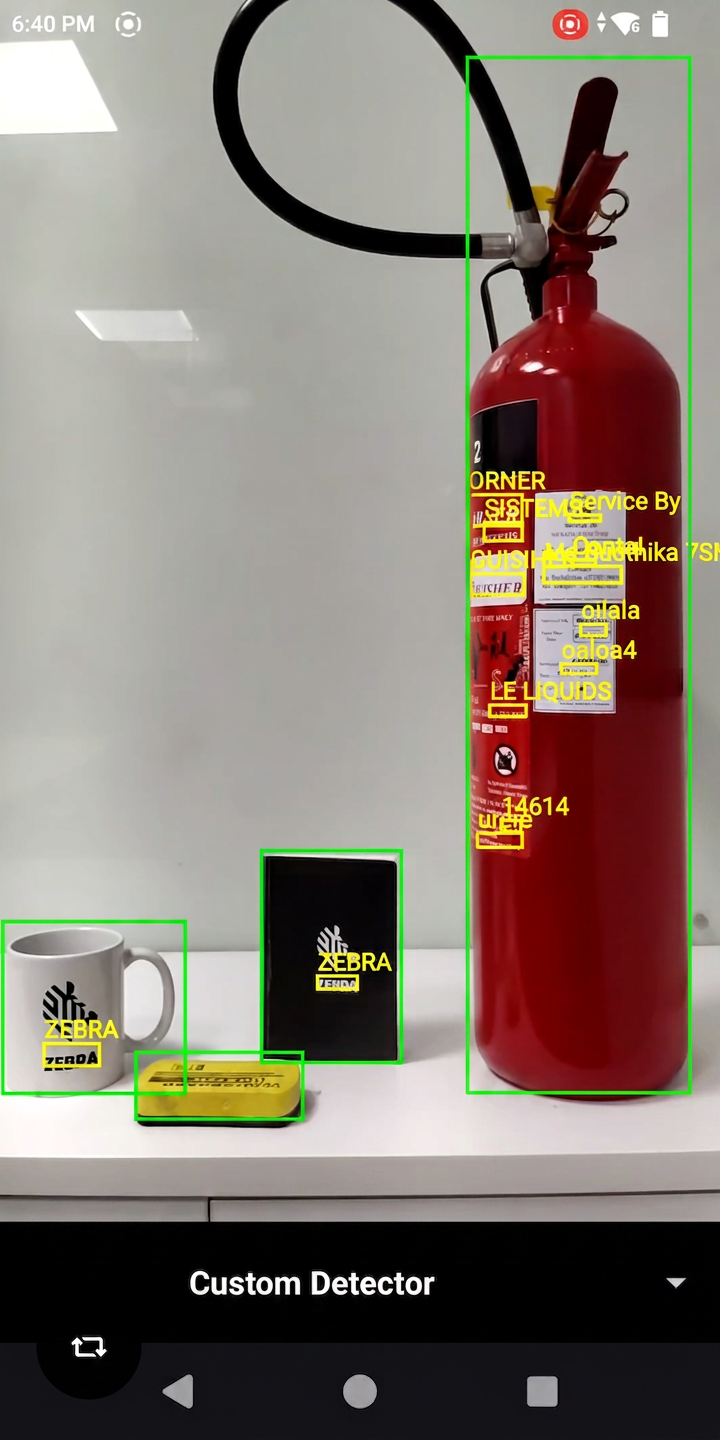
Connect an approved custom detector to the Zebra tracking flow
Custom Detector lets an application integrate a third-party machine-learning model or SDK. This can support an organisation-specific object or condition that is not covered by the standard model set.
The project still needs clear ownership for model training data, testing, false results, versions, device performance and long-term support.
How the pieces connect
The PDA supplies the camera and processing platform; the app supplies the workflow
- The Android application opens the Zebra camera-based capture experience.
- The selected detector or model analyses the camera frame or saved image.
- The viewfinder can show detected, decoded or selected items to the user.
- The application validates the result and sends it to the relevant business process.
- Exceptions are retried, corrected or routed for review.
Application ideas
Where these Zebra PDA functions may fit
| Operation | Useful capability | Example task |
|---|---|---|
| Warehouse receiving | Multi-barcode decoding, OCR, guided viewfinder | Read carton labels, capture printed references and show missing items. |
| Picking and stock checks | Barcode Finder, entity tracking | Locate the required label among similar cartons or locations. |
| Retail shelf work | Product and Shelf Recognizer | Support shelf inspection, product-location or store-audit applications. |
| Delivery and field service | Image attributes, image transformation, PPOD | Check photo quality and prepare a controlled proof record. |
| Specialised inspection | Custom Detector | Recognise an approved organisation-specific object or condition. |
Easy Scan can help review suitable Zebra mobile-computer options, map warehouse and delivery requirements through our transportation and logistics solutions, and consider fleet management through the SOTI ONE Platform.
Device and application requirements
Not every Android device or Zebra model supports every function
Zebra publishes a version-specific device list for AI Data Capture SDK 4.0. The following general list was checked on 30 July 2026; individual functions and models can have narrower support, so confirm the exact model, Android version and detector before procurement.
| Device platform | Android | Models listed by Zebra for SDK 4.0 | Planning note |
|---|---|---|---|
| QC6490 with DSP | Android 14 | TC53, TC58, TC73, TC78, ET60, ET65 | Zebra identifies DSP products as the faster and more battery-efficient direction. |
| QC6490 with DSP | Android 13 | TC58, TC78 | Confirm the exact OS build and planned upgrade path. |
| QC5430 with DSP | Android 14 | EM45 | Check the selected model and expected workload. |
| Q-6690 with DSP | Android 15 | ET401, TC501, TC701 | Listed in Zebra’s version 4.0.6 support update. |
| QC4490 without DSP | Android 14 | TC53e, TC58e, MC9400, MC9450 | Zebra limits this group to still-image use; do not assume the same real-time behaviour. |
Before choosing the PDA
Define the function first, then match the Zebra device and application
| Question | What to prepare |
|---|---|
| What must the user capture? | Real barcodes, labels, shelves, products, printed text or delivery photos. |
| What should happen after capture? | The next screen, validation rule, business-system update and exception route. |
| Where will the PDA be used? | Real lighting, distance, movement, glare, network and environmental conditions. |
| Which application will use the result? | Android application owner, API, offline handling, user confirmation and audit trail. |
| What is an acceptable result? | Representative sample set, success criteria, retake rule and manual fallback. |
| Are privacy controls needed? | Image content, redaction requirement, access, storage and retention rules. |
Zebra documentation
Check the current 4.0 pages before confirming the function and device
Frequently asked questions
Zebra PDA and AI Data Capture 4.0 FAQ
Can a Zebra PDA scan several barcodes in one camera view?
Yes. Barcode Decoder can locate and decode multiple 1D and 2D barcodes from an image. The application still needs rules for selecting, validating and using the required values.
Can it identify retail products and shelf labels?
Product and Shelf Recognizer supports detection of products, shelves, shelf labels and peg labels for retail-facing applications. Product enrolment, model setup and testing in the real store environment are still required.
Can the PDA read printed text as well as barcodes?
Yes. Text OCR can recognise printed words and group results into lines or paragraphs. The application should validate the required field and provide correction or exception handling.
Can it check proof-of-delivery photos?
Zebra provides Image Attributes and Image Transform capabilities plus guided and non-guided Picture Proof of Delivery flows. The organisation must define the required photo content, quality, redaction and review rules.
Does AI Data Capture 4.0 work on every Zebra PDA?
No. Zebra publishes supported models and Android versions, and individual detectors may have narrower device lists. Confirm the exact device, OS, model, memory and required capability before selection.
Is it a ready-made application?
No. It is an SDK, AI model set and application components. A finished workflow still needs an Android application, user interface, business rules, system integration, security and operational support.
Discuss the workflow
Want to know which Zebra PDA function fits your operation?
Easy Scan is a Zebra Premier Solution Partner. Share your workflow, sample labels or photos, existing devices, Android environment and required result. We can help your Hong Kong team structure the device, application and deployment questions.